What’s new in TaskSpend: October 2026
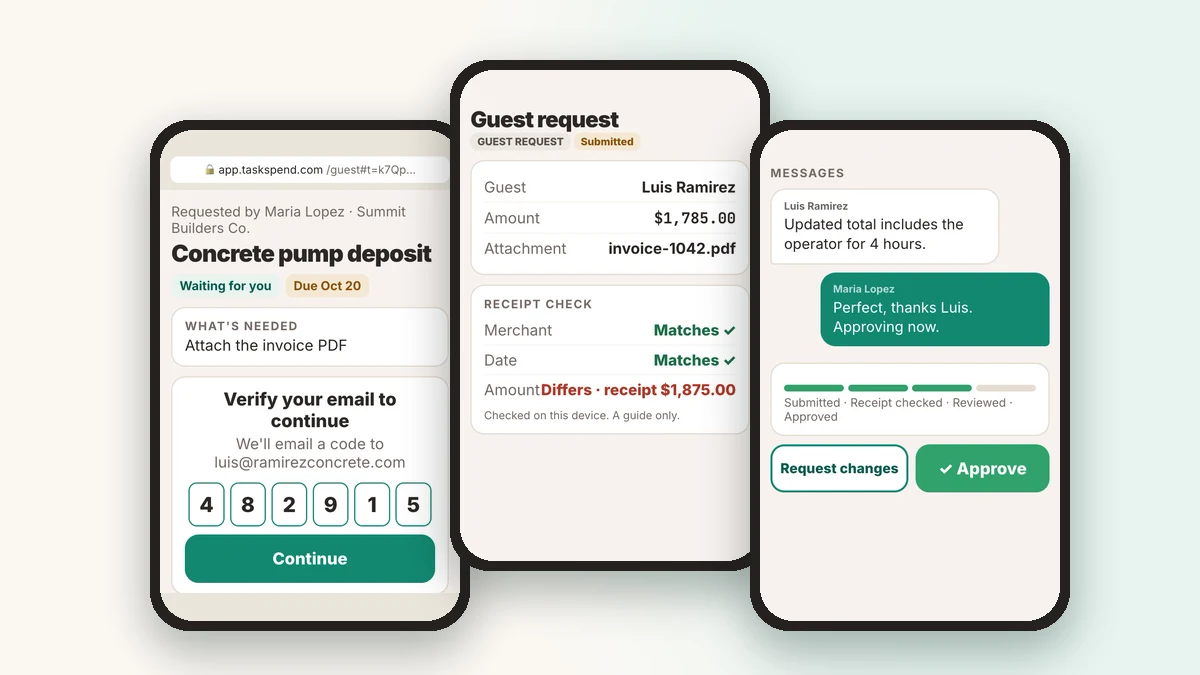
This month TaskSpend learned to work with people who aren’t on your team. Send anyone an expense link and they can hand you a receipt from any browser, with no app and no account. TaskSpend for Android is now on Google Play, and short how-to videos now live right inside the app. TaskSpend 1.5 for iPhone and iPad brings all of it, plus a new workspace screen and income in every workspace, to the App Store.
Where you can use it. Everything in this post is now on iPhone and iPad with TaskSpend 1.5, on Android through Google Play, and in the web app at app.taskspend.com.
Expense links: receipts from anyone
Your subcontractor, a supplier or a relative paying for the flowers doesn’t need to join your workspace to send you a receipt. Send them an expense link instead.
- Send a link. Give it a title, the guest’s email and what you need. TaskSpend emails it, or you copy and share it any way you like.
- They open it in any browser. They confirm their email with a 6-digit code, add the amount and details, and attach a photo or PDF of the receipt or invoice. Any currency works, converted to your project’s currency at the European Central Bank reference rate.
- TaskSpend checks the receipt. It reads the receipt on your device and compares the merchant, date and amount with what they typed. Spot a difference, update the request in one tap and send the check back to them.
- Talk it through, then decide. Message your guest inside the request, ask for changes, approve or reject. Larger requests need a receipt check before they can be approved.
- Close the loop. Save the approved request as an expense, attach your payment proof and mark it paid. Your guest sees every step on the same link.
The free plan includes three expense links a month, and Premium has no limit.
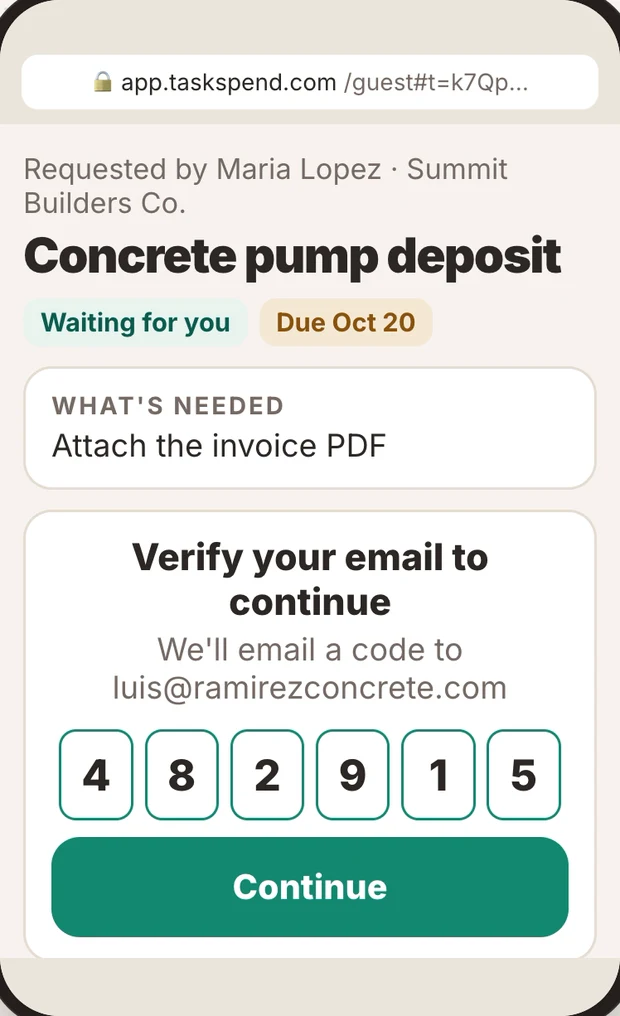
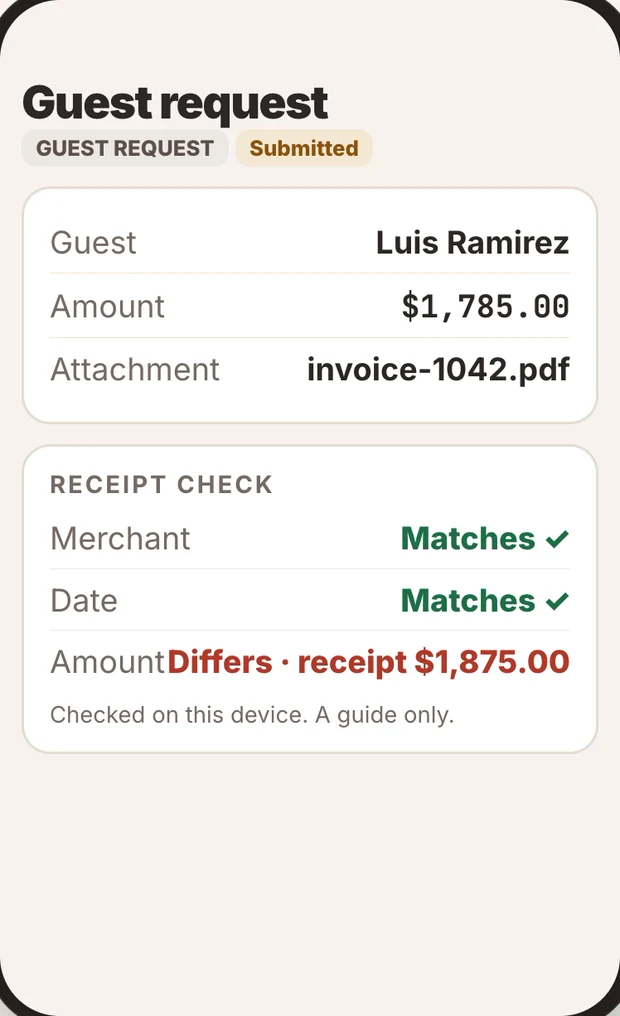
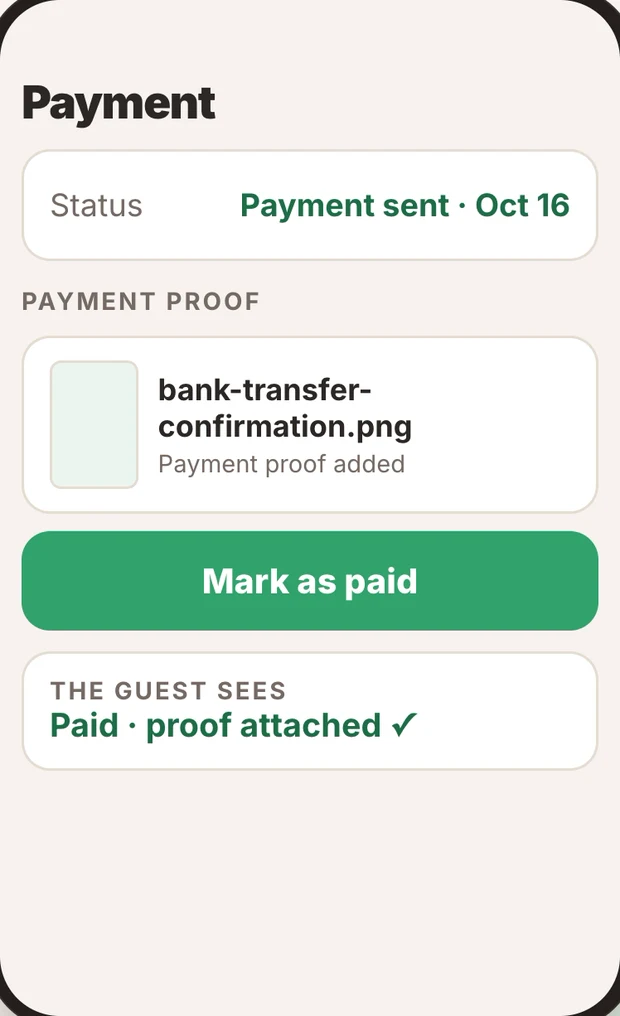
Watch the expense link in under a minute →
TaskSpend for Android
TaskSpend is now on Google Play. Sign in with the same Google account, and your workspaces, projects, budgets and approvals are all there. Premium can be bought through Google Play, and a subscription you already have from the App Store keeps working, so you’re never charged twice.
New in TaskSpend 1.5 for iPhone and iPad
TaskSpend 1.5 is now shipping to the App Store. Along with everything above, it adds:
- A clearer workspace screen. Choose Month, Quarter or Total to see Total income, Total spend and Net (income minus spend), all in your reporting currency. Open All income or All expenses for the full list.
- Income in every workspace, not just Personal. Only the workspace owner can record it and see it. Attach a payment slip, a bank screenshot or a paid invoice to any income entry.
- Record an invoice or receipt as income. The owner can do this once per document, and the amount comes from the invoice. Void the invoice and that income is removed.
- A redesigned Requests list. Switch between All, Members and Guests, scan the sections, and use the + menu to start a new request or an expense link.
- TaskSpend Plus, a new plan that lifts every Free limit on workspaces, projects, expenses, requests, invoices and imports. It also gives you up to 100 teammates and duplicate receipt detection. Premium still adds cloud AI receipt reading and the QuickBooks and Xero connections.
How-to videos, right where you need them
Look for the play button on Add expense, Request, Send expense link, Reports, Add a teammate and Invoices & Receipts. Each one opens a short video of that exact task. Videos download once, so they play again even when you’re offline. You can also watch them all on our videos page and on YouTube.
Bring your team in faster
- Easy Join QR. Show a one-time code as a QR code, and a teammate picks Join a team and scans it. Share the whole workspace or just one project.
- Team hierarchy explains at a glance what Owners, Approvers, Members and Viewers can do, and your seats sit right beside the team list.
- Push notifications for new requests and reviews, which you control under Profile → Notifications.
Smarter scanning and currencies
- A currency picker that lists the common currencies first and searches the rest.
- Scans read in your project’s currency, including Indian dates, lakh amounts and GST.
- Exchange rates follow the European Central Bank’s publication time, and a missed day catches up on its own.
- Built-in category names show in your language.
QuickBooks and Xero
- Each synced expense shows the QuickBooks or Xero mark, so you can see where it went.
- Account suggestions cover every built-in category, and Cost of Goods Sold and Other Expense accounts are now in the list.
- Each expense is pushed once, even if you tap twice.
Also this month
- Subscriptions are visible only to Owners and Approvers.
- Receipts print as a neat till slip, sized to their content.
- Bug fixes and performance work throughout, especially offline.
Get TaskSpend 1.5
Update on the App Store for iPhone and iPad, install it from Google Play on Android, or sign in at app.taskspend.com with your Apple or Google account.
Get TaskSpend