Construction expense tracking for small contractors: budgets, receipts and approvals that keep a job honest

On a small crew, the margin lives in the job costs. A missed receipt here, an unplanned supply run there, and a job that looked profitable on the quote quietly is not. The fix is not more paperwork. It is less, done at the right moment: a budget per job, receipts filed at the counter, big buys asked about before they happen, and a handover without the shoebox. Here is the whole setup, and one ordinary week to show it working.
One project per job
Each job gets its own project with its own budget, split the way estimators think: Labor, Materials, Equipment, and whatever else the job needs. Every dollar that follows lands against one of those categories, so “how are we doing on materials?” has an answer in the moment, not at closeout.
Receipts at the supply-house counter
The crew photographs the receipt while they are still at the counter. TaskSpend fills in the merchant, amount and date, they pick the job, and it is filed before the tailgate closes. No fistful of paper riding around in the truck. Card statements can be imported at month end as a PDF or CSV to catch anything that slipped through.
Big buys get asked about first: the approval workflow
In most teams, “approval” means someone reviews expenses at month end, after the money is gone. At that point there is nothing to decide; you are just finding out. The only version of approval that protects a budget is the one that happens before the spend, and a small crew needs it to be light. Four steps:
- Set the ground rules once. Give the project a budget by category, and decide who approves. In TaskSpend that is a role, not a meeting: Owners and Approvers see the queue, everyone else submits.
- Ask first for anything big. A vendor deposit, an equipment rental above someone’s limit, a trip with per-diem and mileage worked out up front. The request carries the quote, and questions happen right on it, in its own thread, instead of scattered texts.
- Decide with the facts on the card. The approver sees the amount, the project, and what is left in the budget, then approves or declines in a tap, usually from another site.
- Let the paperwork do itself. An approved request becomes a logged expense against the right category. No retyping, no reconciliation later.
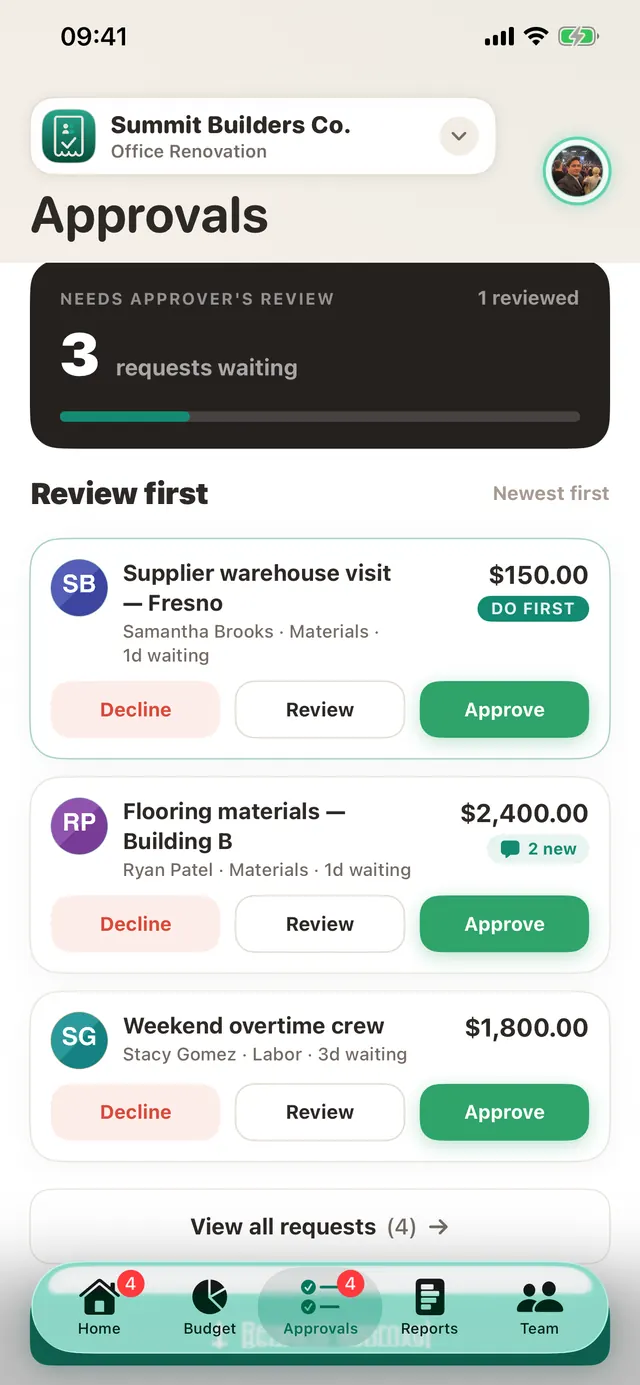
The trick to a workflow people actually follow is to make the common case effortless:
- Auto-approval limits. Set a threshold per category and small routine purchases approve themselves. Humans only look at the spends that deserve a human.
- Clear a backlog in one go. Back from a week off? Decide the whole queue at once, with one note to the team.
- No chasing. Requests sit in one badged queue rather than in text messages, so nothing quietly ages out.
Start small. Pick one job and one approver, and route just the big purchases through requests for a month. Most crews never go back.
Know where the job stands
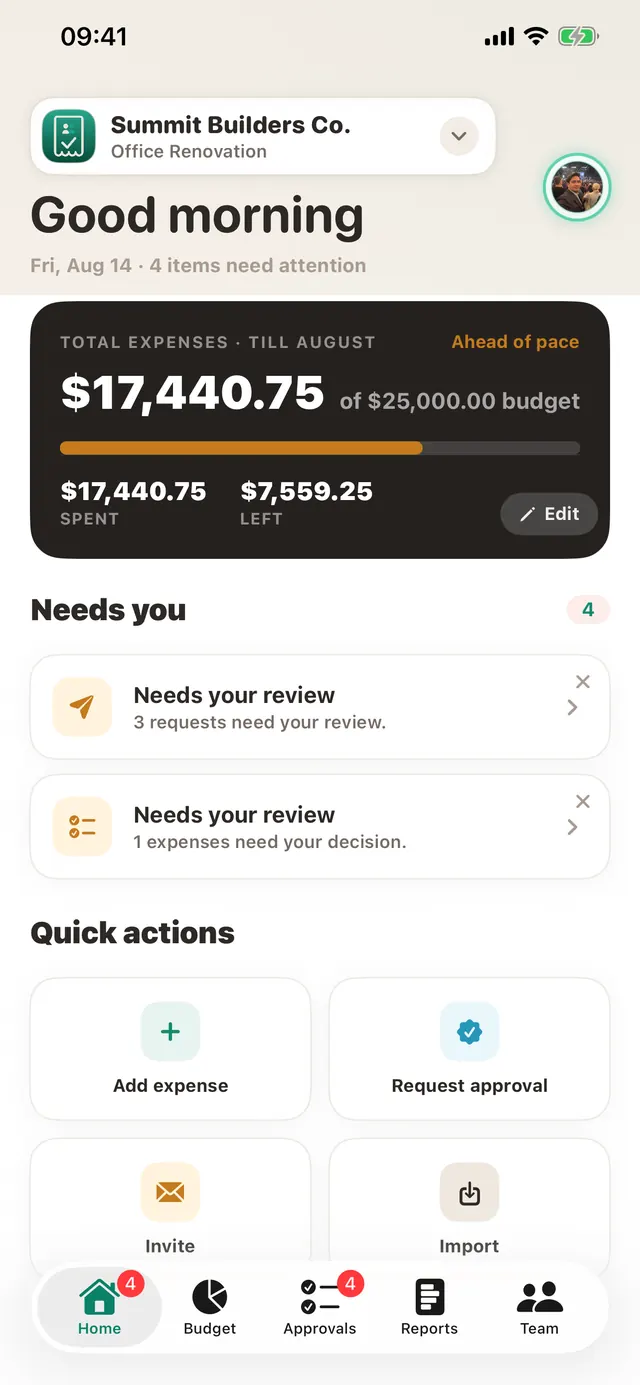
The dashboard shows spent, approved and remaining per category, and flags a category the moment it goes over its allocation, while there is still time to talk to the client about a change order instead of discovering it at closeout.
A week on site
Follow an imaginary crew of six through one very normal week. They are not real customers, they are a stand-in for the kind of week most small teams would recognise. The job is a kitchen refit. The budget is $24,300. The owner, Sam, has three people on site, one runner, and a bookkeeper who appears on Fridays and would like everyone to be kinder to her.
- Monday: the small spend nobody mentions. The runner buys $180 of fixings. In most weeks that receipt lives in a pocket until Friday, and the budget quietly runs $180 hotter than anyone thinks. Here he photographs it in the car park. Ten seconds. Sam does not have to be told, because the number on her screen already moved.
- Tuesday: the question that costs money. A tiler asks whether they can hire a bigger cutter for two days. $260. This is where budgets actually break, not in a spreadsheet but in a conversation where nobody is quite sure who decides. He sends the request from his phone with a photo and a note. Sam sees what is left in the tools line, taps approve, and work carries on. Nine minutes, start to finish.
- Wednesday: someone drives a long way. The second fixer drives 140 miles to collect a part. Mileage and a day’s per-diem get estimated up front and approved like anything else, so nobody discovers it as a surprise two weeks later.
- Thursday: the honest moment. Materials go over their allocation. Sam gets an alert, not a cheerful “you are at 80%” nudge, but a plain message that this category is now over.
- Friday: the bookkeeper has a nice day. Nothing is in a pocket. Every expense has a receipt attached and a project against it. She exports the report as a PDF, pushes the approved expenses across to the accounts, and leaves on time.
Knowing on Thursday is worth far more than knowing on the 30th. On Thursday you can still move something. On the 30th you can only write it down.
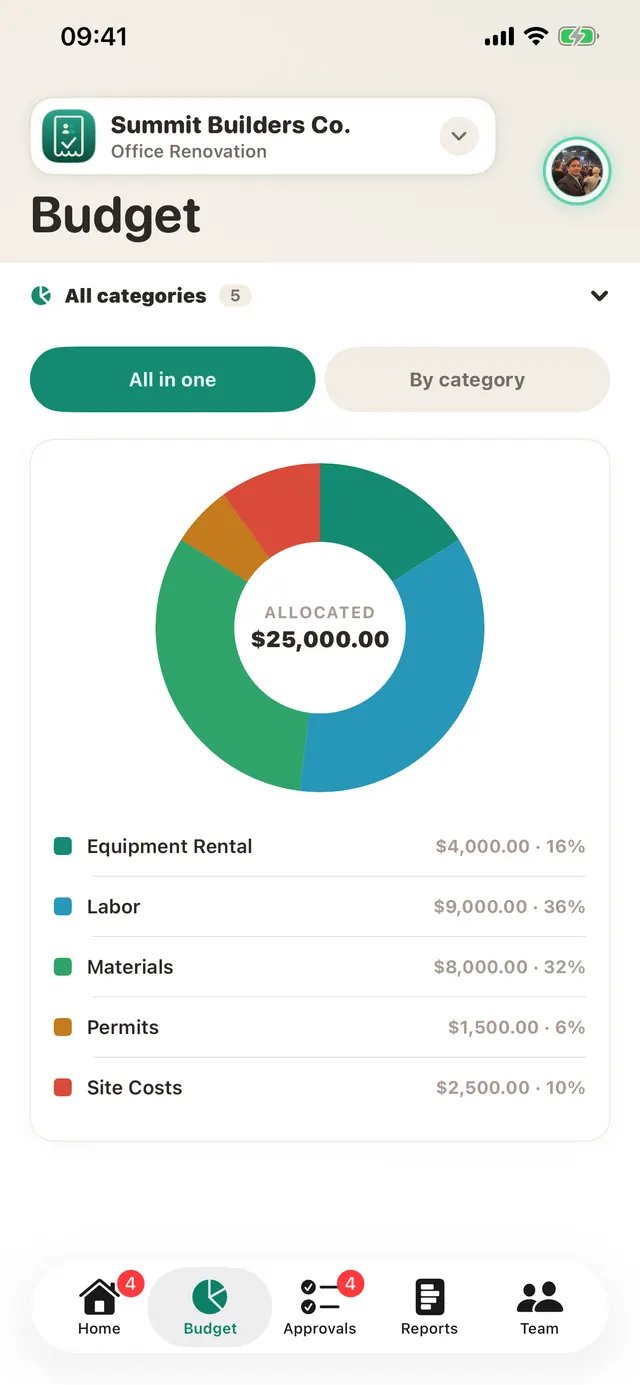
Not the work changed. The crew did the same job in the same week. What changed is that every small decision happened while it was still small: a ten-second photo, a nine-minute approval, an alert on Thursday rather than a shock on the 30th. And everyone saw only what they needed to. The crew see their own rows. Sam sees the whole budget. Nobody had to be trusted with a spreadsheet they should not have had.
Handover without the shoebox
At the end of the job, export an itemised PDF with every receipt attached for the client or the accountant, or CSV for whatever they use. Premium workspaces can also push approved expenses straight into QuickBooks Online or Xero; nothing syncs without your say-so.
Run your next job on TaskSpend
Free to start: one job, up to ten people, receipts and approvals included.
Get TaskSpend